Budget
Intermediate
Free · Google Sheets
Monthly Budget Planner
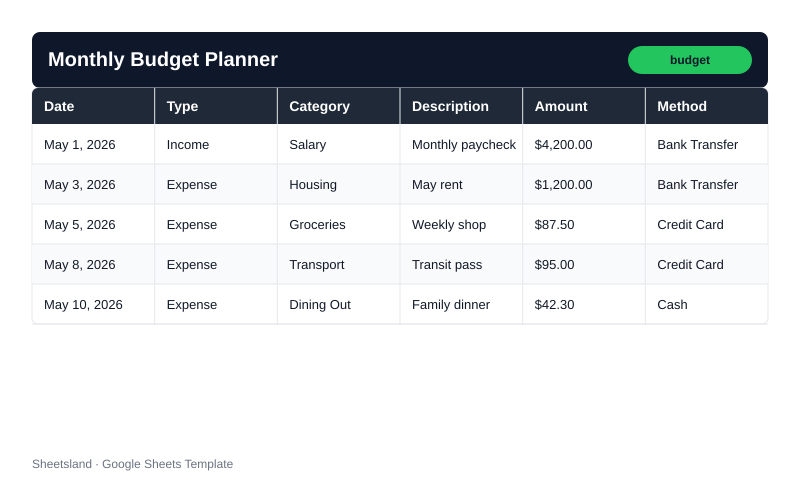
Free Google Sheets template that tracks income, categorizes expenses, monitors category spending limits, and shows your savings rate — no formulas required.
Features
- Per-category monthly budget limits with On Track / Near Limit / Over Budget status
- Automatic savings rate calculated as (Income − Expenses) / Income each month
- Month-over-month income and expense change columns in the Monthly Summary tab
- Settings tab as a single control panel for categories, limits, and payment methods
- Payment method tracking (Credit Card, Cash, Bank Transfer, and custom methods)
- ARRAYFORMULA auto-fills the Month column as you add transactions — no copy-paste
- Dashboard tab with KPI cards, budget status counts, top spending categories, and alerts
- Conditional formatting highlights Over Budget rows in red and Near Limit rows in yellow
Who is this for?
- Individuals managing a personal monthly budget for the first time with a spreadsheet
- Families and couples tracking shared household income and expenses by category
- Freelancers with variable monthly income who need month-over-month visibility
- Anyone who has outgrown a simple expense tracker and needs per-category limits
How to use
- Make a Copy. Click Make a Copy to save the template to your Google Drive.
- Configure Settings. Open the Settings tab and update your currency symbol, income categories, expense categories, budget limits, and payment methods.
- Log Transactions. Go to the Transactions tab and start logging entries: date, type, category, description, amount, and payment method.
- Check Monthly Summary. Check the Monthly Summary tab to see your total income, expenses, savings rate, and month-over-month changes.
- Review Category Summary. Open the Category Summary tab to see which categories are On Track, Near Limit, or Over Budget.
- Visit Dashboard. Visit the Dashboard tab for a quick overview of your budget health.
Frequently asked questions
- Yes. Monthly Budget Planner is completely free. Click Make a Copy to get your own editable Google Sheets version. No account is required beyond a standard Google account.
- Yes. Open the Settings tab and edit the category list. Every other tab — Transactions, Monthly Summary, Category Summary, and Dashboard — updates automatically.
- Google Sheets works on Android and iOS. The Transactions tab is designed for entry on mobile. The Dashboard and Summary tabs are best viewed on a wider screen.
- Select rows 2 through the last sample row in the Transactions tab and press Delete. All summary tabs update immediately. Your Settings data is not affected.
- Yes. The Monthly Summary tab adds a new row for each month automatically as you log transactions. Category Summary lets you filter by any month using the dropdown in cell F1.
Ready to take control of your budget?
Make a free copy to your Google Drive. No account required beyond a standard Google account.
Make a Copy — Free